QR-bill
—
QR-bill - Pay and create invoices with ease
The Swiss QR Code contains all the key payment details. This simplifies the capture and processing of payments, reduces the need for manual data entry and supports automated payment reconciliation. Whether you wish to pay an invoice or issue QR bills yourself, you’ll find the key information and current requirements here.
A short guide to the QR-bill
Just like our previously used payment slips, the QR-bill is divided into two parts: a receipt and a payment section. The main difference is the Swiss QR code located in the payment section. It contains all the relevant information needed both to issue an invoice and to make a payment. The information is also clearly written on the bill so that it can still be read and entered manually.
Here we outline the three types of QR-bill:
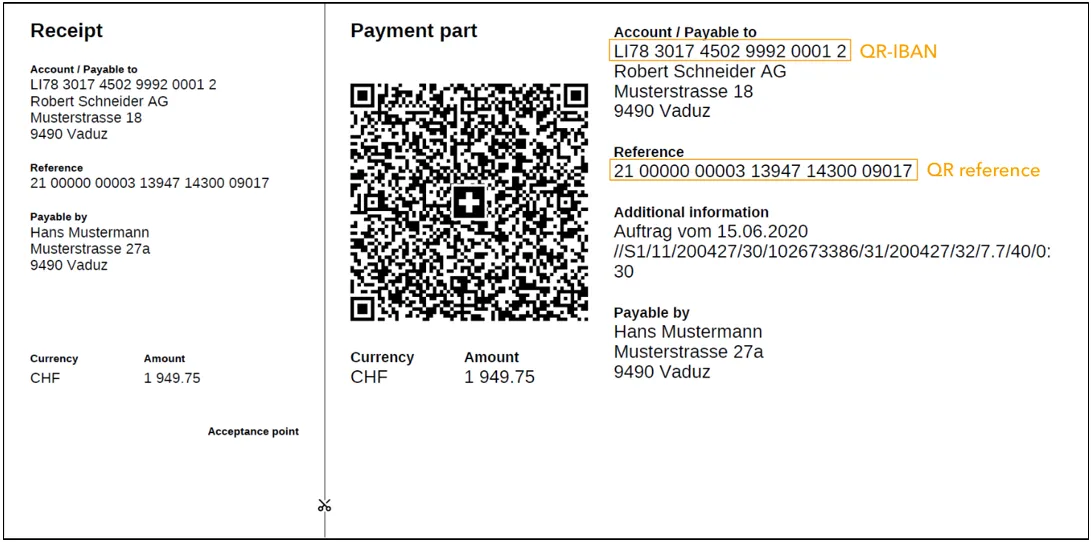
Payment section with a QR reference
This version replaces the orange payment slips and contains a QR-IBAN and a QR reference. The QR reference is equivalent to the ESR reference number and, like its predecessor, allows the bill issuer to check payments against the relevant invoices. Existing ESR reference numbers can still be used as before.
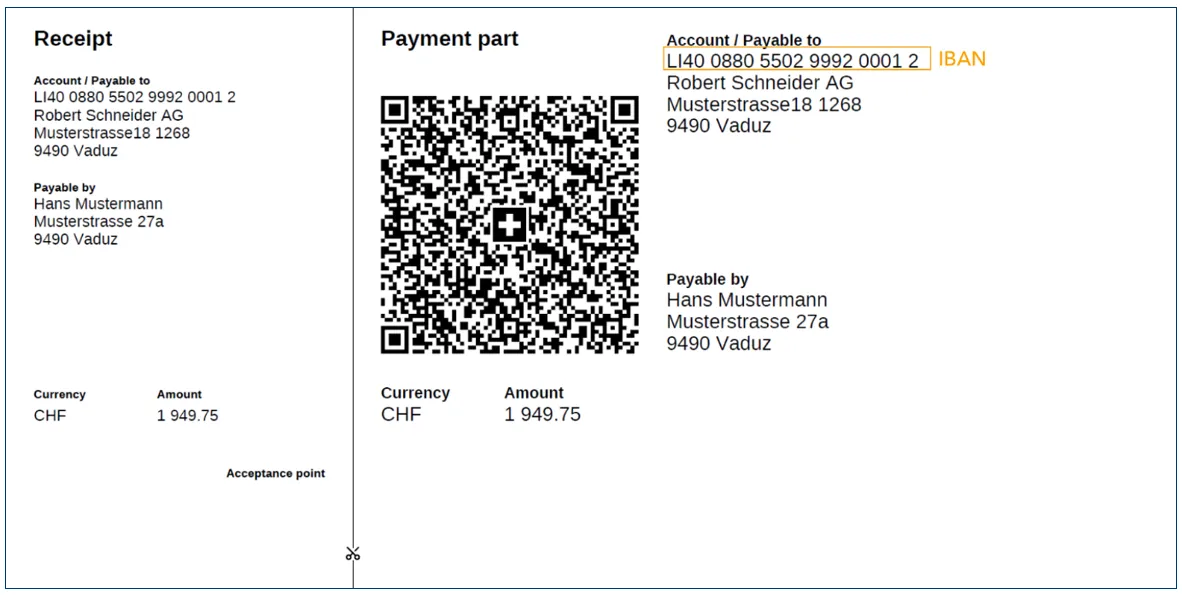
Payment section without a reference
The QR-bill that features an IBAN and no reference replaces the red payment slips. This version enables invoices to be issued simply.
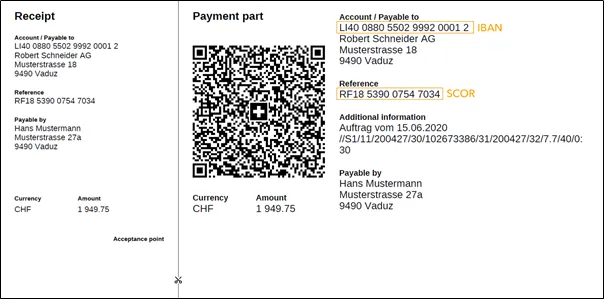
Payment section with a Creditor Reference (SCOR)
The Creditor Reference serves the same function as a QR reference. The difference is that the Creditor Reference can be used in international payment transactions while the above-mentioned payment sections are restricted to the Swiss franc area (Switzerland and Liechtenstein). The IBAN is also used for the account information.
Pay QR invoices with ease
With VP Bank e-banking, you can conveniently enter and pay QR invoices. Scan the Swiss QR Code using the VP Bank Connect app and transfer the payment details directly into the payment order.
Your benefits
- Less manual input thanks to the automatic transfer of payment details
- Quick and convenient payment entry in VP Bank e-banking
- Reduced risk of errors when entering payment details
- Option to enter multiple QR invoices using the multi-scan function
- Manual payment entry as an alternative to scanning
Check the imported payment details before authorising the payment order.
Create QR invoices easily
QR invoices also offer advantages for invoice issuers. You can send invoices digitally as PDFs or in printed form and streamline payment processing.
Your benefits
- Easy creation and transmission of invoices
- Support for payments in CHF and EUR
- Automated allocation of incoming payments using reference numbers
- Reduced manual effort in accounts receivable
- Improved data quality during payment processing
For QR invoices with a QR reference, you will need a QR-IBAN, which you can obtain from VP Bank.
If you use accounting or invoicing software, please ensure that it supports the current requirements for QR invoices. The relevant electronic account information is available for the automated reconciliation of incoming payments. Your client advisor will be happy to assist you with any questions regarding the solutions on offer.
Useful tip
The QR-IBAN should not be confused with the IBAN. Both use a different institute identification (IID). The QR-IBAN can be recognised using the IID, which will have a value between 30,000 and 31,999. To make it easier for you to distinguish between the two numbers in future, we have given an example with the relevant section in bold:
IBAN LI40 0880 5501 0008 0001 8
QR-IBAN LI78 3017 4050 2999 2001 2
Current requirements for QR invoices
Structured addresses
From November 2025, only structured addresses will be permitted in the Swiss QR Code. This means that address details – such as street, house number, postcode, town and country – are recorded in separate data fields. An extended character set, including additional umlauts and special characters, is also supported.
If you create QR invoices yourself, you should ensure that your invoicing software complies with these requirements. If necessary, check existing templates as well.
Swiss Payment Standards 2026
The Swiss payment standards are constantly being developed. On 14 November 2026, version 2.4 of the Implementation Guidelines for the QR invoice will come into force.
This will not require any additional technical adjustments for invoicing in Swiss francs. For QR invoices in euros, the specific requirements regarding permissible combinations of IBAN and reference must be observed.
The QR-bill is a new payment slip that will be used for Swiss payment transactions as from 30 June 2020. It will make it easier to issue and pay bills and replaces today’s red and orange payment slips by October 1, 2022.
Yes, QR-bills can easily be scanned and paid using the app, as well as using VP Bank’s web application.
In order to scan QR-bills, you need to have the VP Bank Connect app installed on your smartphone. You can use the web application to scan one or more QR-bills with your smartphone and complete them in the client portal.
Multipay is not available for payments for which additional details, such as the amount, are required in order to make the payment.
Scanned QR-bills are stored for you in the client portal. The next time you log in, you will be reminded that payments are waiting to be completed.
In VP Bank e-banking, under ‘Payments’, select the ‘Create payment’ function and then ‘Scan QR-bill’. To scan using your smart phone, you will need the VP Bank Connect app installed.
If the “Scan QR-bill” option is not visible, this means that you have not yet registered for VP Bank Connect. Order your Connect code here.
You can use our web application to manually record QR-bills in the event that the scanning feature is not activated for QR-bills. Alternatively, you can scan QR-bills using a hand scanner.
Yes, VP Bank offers an automatic payment check for QR-bills with a reference number. Starting 30 June 2020, the QRR transfer service will be automatically available for clients who are already using BESR transfer. If you have not yet used the automatic payment check but are interested in doing so, we will be happy to set up the service for you. Please contact your client advisor to arrange for this.
It is possible to scan QR-bills using a hand scanner. However, this QR code reader must be purchased separately.
You can order QR-bills for your bank account at VP Bank. To do so, please contact your client advisor.
Please contact your client advisor for this information.
Pay simply with the QR-bill: www.einfach-zahlen.ch/en/home.html
Frequently asked questions: www.paymentstandards.ch/en/shared/know-how/faq/qr.html

Do you have any questions about QR bills?
Would you like to issue QR invoices, obtain a QR-IBAN or optimise the processing of your incoming payments? Your client advisor will be happy to assist you.
Do you have any questions about QR bills?
Would you like to issue QR invoices, obtain a QR-IBAN or optimise the processing of your incoming payments? Your client advisor will be happy to assist you.